TGI: быстрый старт, но для продакшена vLLM или SGLang
TGI — устаревший инструмент инференса, рекомендуется vLLM или SGLang.
TGI — устаревший инструмент инференса, рекомендуется vLLM или SGLang.
Можно использовать TGI как быстрый способ поднять инференс-сервер для прототипов и тестов, особенно благодаря OpenAI-совместимому API. Но для долгосрочной оркестрации лучше сразу закладывать vLLM или SGLang, так как TGI в режиме поддержки. Полезно изучить подходы TGI к батчингу и квантизации для оптимизации своих сервисов.
расшифровка ролика ↓
> [!CAUTION] > text-generation-inference is now in maintenance mode. Going forward, we will accept pull requests for minor bug fixes, documentation improvements and lightweight maintenance tasks. > > TGI has initiated the movement for optimized inference engines to rely on a `transformers` model architectures. This approach is now adopted by downstream inference engines, which we contribute to and recommend using going forward: [vllm](https://github.com/vllm-project/vllm), [SGLang](https://github.com/sgl-project/sglang), as well as local engines with inter-compatibility such as llama.cpp or MLX.
<div align="center">
<a href="https://www.youtube.com/watch?v=jlMAX2Oaht0"> <img width=560 alt="Making TGI deployment optimal" src="https://huggingface.co/datasets/Narsil/tgi_assets/resolve/main/thumbnail.png"> </a>
# Text Generation Inference
<a href="https://github.com/huggingface/text-generation-inference"> <img alt="GitHub Repo stars" src="https://img.shields.io/github/stars/huggingface/text-generation-inference?style=social"> </a> <a href="https://huggingface.github.io/text-generation-inference"> <img alt="Swagger API documentation" src="https://img.shields.io/badge/API-Swagger-informational"> </a>
A Rust, Python and gRPC server for text generation inference. Used in production at [Hugging Face](https://huggingface.co) to power Hugging Chat, the Inference API and Inference Endpoints.
</div>
## Table of contents
- [Get Started](#get-started) - [Docker](#docker) - [API documentation](#api-documentation) - [Using a private or gated model](#using-a-private-or-gated-model) - [A note on Shared Memory (shm)](#a-note-on-shared-memory-shm) - [Distributed Tracing](#distributed-tracing) - [Architecture](#architecture) - [Local install](#local-install) - [Local install (Nix)](#local-install-nix) - [Optimized architectures](#optimized-architectures) - [Run locally](#run-locally) - [Run](#run) - [Quantization](#quantization) - [Develop](#develop) - [Testing](#testing)
Text Generation Inference (TGI) is a toolkit for deploying and serving Large Language Models (LLMs). TGI enables high-performance text generation for the most popular open-source LLMs, including Llama, Falcon, StarCoder, BLOOM, GPT-NeoX, and [more](https://huggingface.co/docs/text-generation-inference/supported_models). TGI implements many features, such as:
- Simple launcher to serve most popular LLMs - Production ready (distributed tracing with Open Telemetry, Prometheus metrics) - Tensor Parallelism for faster inference on multiple GPUs - Token streaming using Server-Sent Events (SSE) - Continuous batching of incoming requests for increased total throughput - [Messages API](https://huggingface.co/docs/text-generation-inference/en/messages_api) compatible with Open AI Chat Completion API - Optimized transformers code for inference using [Flash Attention](https://github.com/HazyResearch/flash-attention) and [Paged Attention](https://github.com/vllm-project/vllm) on the most popular architectures - Quantization with : - [bitsandbytes](https://github.com/TimDettmers/bitsandbytes) - [GPT-Q](https://arxiv.org/abs/2210.17323) - [EETQ](https://github.com/NetEase-FuXi/EETQ) - [AWQ](https://github.com/casper-hansen/AutoAWQ) - [Marlin](https://github.com/IST-DASLab/marlin) - [fp8](https://developer.nvidia.com/blog/nvidia-arm-and-intel-publish-fp8-specification-for-standardization-as-an-interchange-format-for-ai/) - [Safetensors](https://github.com/huggingface/safetensors) weight loading - Watermarking with [A Watermark for Large Language Models](https://arxiv.org/abs/2301.10226) - Logits warper (temperature scaling, top-p, top-k, repetition penalty, more details see [transformers.LogitsProcessor](https://huggingface.co/docs/transformers/internal/generation_utils#transformers.LogitsProcessor)) - Stop sequences - Log probabilities - [Speculation](https://huggingface.co/docs/text-generation-inference/conceptual/speculation) ~2x latency - [Guidance/JSON](https://huggingface.co/docs/text-generation-inference/conceptual/guidance). Specify output format to speed up inference and make sure the output is valid according to some specs.. - Custom Prompt Generation: Easily generate text by providing custom prompts to guide the model's output - Fine-tuning Support: Utilize fine-tuned models for specific tasks to achieve higher accuracy and performance
### Hardware support
- [Nvidia](https://github.com/huggingface/text-generation-inference/pkgs/container/text-generation-inference) - [AMD](https://github.com/huggingface/text-generation-inference/pkgs/container/text-generation-inference) (-rocm) - [Inferentia](https://github.com/huggingface/optimum-neuron/tree/main/text-generation-inference) - [Intel GPU](https://github.com/huggingface/text-generation-inference/pull/1475) - [Gaudi](https://github.com/huggingface/tgi-gaudi) - [Google TPU](https://huggingface.co/docs/optimum-tpu/howto/serving)
## Get Started
### Docker
For a detailed starting guide, please see the [Quick Tour](https://huggingface.co/docs/text-generation-inference/quicktour). The easiest way of getting started is using the official Docker container:
```shell model=HuggingFaceH4/zephyr-7b-beta # share a volume with the Docker container to avoid downloading weights every run volume=$PWD/data
docker run --gpus all --shm-size 1g -p 8080:80 -v $volume:/data \ ghcr.io/huggingface/text-generation-inference:3.3.5 --model-id $model ```
And then you can make requests like
```bash curl 127.0.0.1:8080/generate_stream \ -X POST \ -d '{"inputs":"What is Deep Learning?","parameters":{"max_new_tokens":20}}' \ -H 'Content-Type: application/json' ```
You can also use [TGI's Messages API](https://huggingface.co/docs/text-generation-inference/en/messages_api) to obtain Open AI Chat Completion API compatible responses.
```bash curl localhost:8080/v1/chat/completions \ -X POST \ -d '{ "model": "tgi", "messages": [ { "role": "system", "content": "You are a helpful assistant." }, { "role": "user", "content": "What is deep learning?" } ], "stream": true, "max_tokens": 20 }' \ -H 'Content-Type: application/json' ```
**Note:** To use NVIDIA GPUs, you need to install the [NVIDIA Container Toolkit](https://docs.nvidia.com/datacenter/cloud-native/container-toolkit/install-guide.html). We also recommend using NVIDIA drivers with CUDA version 12.2 or higher. For running the Docker container on a machine with no GPUs or CUDA support, it is enough to remove the `--gpus all` flag and add `--disable-custom-kernels`, please note CPU is not the intended platform for this project, so performance might be subpar.
**Note:** TGI supports AMD Instinct MI210 and MI250 GPUs. Details can be found in the [Supported Hardware documentation](https://huggingface.co/docs/text-generation-inference/installation_amd#using-tgi-with-amd-gpus). To use AMD GPUs, please use `docker run --device /dev/kfd --device /dev/dri --shm-size 1g -p 8080:80 -v $volume:/data ghcr.io/huggingface/text-generation-inference:3.3.5-rocm --model-id $model` instead of the command above.
To see all options to serve your models (in the [code](https://github.com/huggingface/text-generation-inference/blob/main/launcher/src/main.rs) or in the cli): ``` text-generation-launcher --help ```
### API documentation
You can consult the OpenAPI documentation of the `text-generation-inference` REST API using the `/docs` route. The Swagger UI is also available at: [https://huggingface.github.io/text-generation-inference](https://huggingface.github.io/text-generation-inference).
### Using a private or gated model
You have the option to utilize the `HF_TOKEN` environment variable for configuring the token employed by `text-generation-inference`. This allows you to gain access to protected resources.
For example, if you want to serve the gated Llama V2 model variants:
1. Go to https://huggingface.co/settings/tokens 2. Copy your CLI READ token 3. Export `HF_TOKEN=<your CLI READ token>`
or with Docker:
```shell model=meta-llama/Meta-Llama-3.1-8B-Instruct volume=$PWD/data # share a volume with the Docker container to avoid downloading weights every run token=<your cli READ token>
docker run --gpus all --shm-size 1g -e HF_TOKEN=$token -p 8080:80 -v $volume:/data \ ghcr.io/huggingface/text-generation-inference:3.3.5 --model-id $model ```
### A note on Shared Memory (shm)
[`NCCL`](https://docs.nvidia.com/deeplearning/nccl/user-guide/docs/index.html) is a communication framework used by `PyTorch` to do distributed training/inference. `text-generation-inference` makes use of `NCCL` to enable Tensor Parallelism to dramatically speed up inference for large language models.
In order to share data between the different devices of a `NCCL` group, `NCCL` might fall back to using the host memory if peer-to-peer using NVLink or PCI is not possible.
To allow the container to use 1G of Shared Memory and support SHM sharing, we add `--shm-size 1g` on the above command.
If you are running `text-generation-inference` inside `Kubernetes`. You can also add Shared Memory to the container by creating a volume with:
```yaml - name: shm emptyDir: medium: Memory sizeLimit: 1Gi ```
and mounting it to `/dev/shm`.
Finally, you can also disable SHM sharing by using the `NCCL_SHM_DISABLE=1` environment variable. However, note that this will impact performance.
### Distributed Tracing
`text-generation-inference` is instrumented with distributed tracing using OpenTelemetry. You can use this feature by setting the address to an OTLP collector with the `--otlp-endpoint` argument. The default service name can be overridden with the `--otlp-service-name` argument
### Architecture
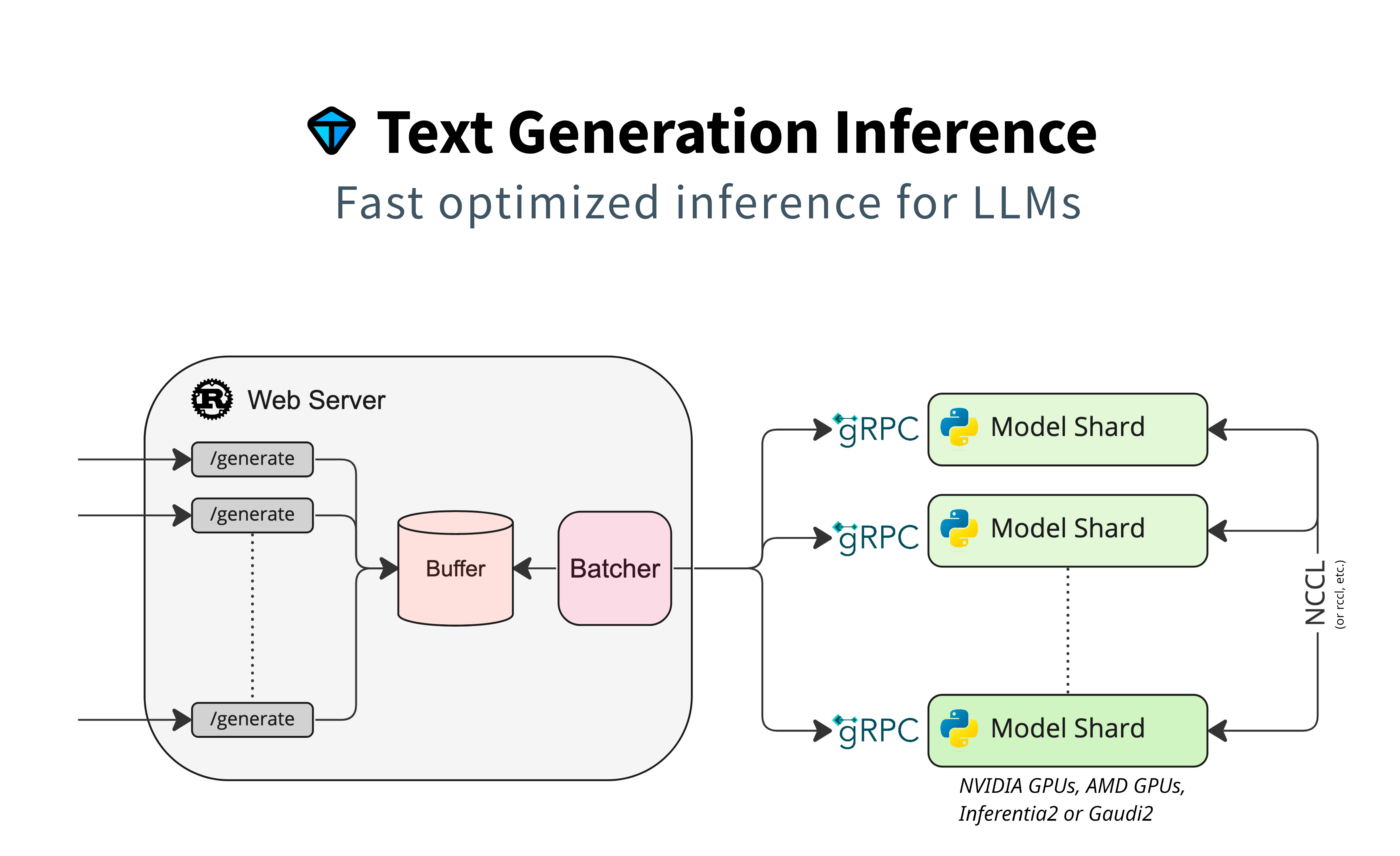
Detailed blogpost by Adyen on TGI inner workings: [LLM inference at scale with TGI (Martin Iglesias Goyanes - Adyen, 2024)](https://www.adyen.com/knowledge-hub/llm-inference-at-scale-with-tgi)
### Local install
You can also opt to install `text-generation-inference` locally.
First clone the repository and change directory into it:
```shell git clone https://github.com/huggingface/text-generation-inference cd text-generation-inference ```
Then [install Rust](https://rustup.rs/) and create a Python virtual environment with at least Python 3.9, e.g. using `conda` or `python venv`:
```shell curl --proto '=https' --tlsv1.2 -sSf https://sh.rustup.rs | sh
#using conda conda create -n text-generation-inference python=3.11 conda activate text-generation-inference
#using python venv python3 -m venv .venv source .venv/bin/activate ```
You may also need to install Protoc.
On Linux:
```shell PROTOC_ZIP=protoc-21.12-linux-x86_64.zip curl -OL https://github.com/protocolbuffers/protobuf/releases/download/v21.12/$PROTOC_ZIP sudo unzip -o $PROTOC_ZIP -d /usr/local bin/protoc sudo unzip -o $PROTOC_ZIP -d /usr/local 'include/*' rm -f $PROTOC_ZIP ```
On MacOS, using Homebrew:
```shell brew install protobuf ```
Then run:
```shell BUILD_EXTENSIONS=True make install # Install repository and HF/transformer fork with CUDA kernels text-generation-launcher --model-id mistralai/Mistral-7B-Instruct-v0.2 ```
**Note:** on some machines, you may also need the OpenSSL libraries and gcc. On Linux machines, run:
```shell sudo apt-get install libssl-dev gcc -y ```
### Local install (Nix)
Another option is to install `text-generation-inference` locally using [Nix](https://nixos.org). Currently, we only support Nix on x86_64 Linux with CUDA GPUs. When using Nix, all dependencies can be pulled from a binary cache, removing the need to build them locally.
First follow the instructions to [install Cachix and enable the Hugging Face cache](https://app.cachix.org/cache/huggingface). Setting up the cache is important, otherwise Nix will build many of the dependencies locally, which can take hours.
After that you can run TGI with `nix run`:
```shell cd text-generation-inference nix run --extra-experimental-features nix-command --extra-experimental-features flakes . -- --model-id meta-llama/Llama-3.1-8B-Instruct ```
**Note:** when you are using Nix on a non-NixOS system, you have to [make some symlinks](https://danieldk.eu/Nix-CUDA-on-non-NixOS-systems#make-runopengl-driverlib-and-symlink-the-driver-library) to make the CUDA driver libraries visible to Nix packages.
For TGI development, you can use the `impure` dev shell:
```shell nix develop .#impure
# Only needed the first time the devshell is started or after updating the protobuf. ( cd server mkdir text_generation_server/pb || true python -m grpc_tools.protoc -I../proto/v3 --python_out=text_generation_server/pb \ --grpc_python_out=text_generation_server/pb --mypy_out=text_generation_server/pb ../proto/v3/generate.proto find text_generation_server/pb/ -type f -name "*.py" -print0 -exec sed -i -e 's/^\(import.*pb2\)/from . \1/g' {} \; touch text_generation_server/pb/__init__.py ) ```
All development dependencies (cargo, Python, Torch), etc. are available in this dev shell.
## Optimized architectures
TGI works out of the box to serve optimized models for all modern models. They can be found in [this list](https://huggingface.co/docs/text-generation-inference/supported_models).
Other architectures are supported on a best-effort basis using:
`AutoModelForCausalLM.from_pretrained(<model>, device_map="auto")`
or
`AutoModelForSeq2SeqLM.from_pretrained(<model>, device_map="auto")`
## Run locally
### Run
```shell text-generation-launcher --model-id mistralai/Mistral-7B-Instruct-v0.2 ```
### Quantization
You can also run pre-quantized weights (AWQ, GPTQ, Marlin) or on-the-fly quantize weights with bitsandbytes, EETQ, fp8, to reduce the VRAM requirement:
```shell text-generation-launcher --model-id mistralai/Mistral-7B-Instruct-v0.2 --quantize ```
4bit quantization is available using the [NF4 and FP4 data types from bitsandbytes](https://arxiv.org/pdf/2305.14314.pdf). It can be enabled by providing `--quantize bitsandbytes-nf4` or `--quantize bitsandbytes-fp4` as a command line argument to `text-generation-launcher`.
Read more about quantization in the [Quantization documentation](https://huggingface.co/docs/text-generation-inference/en/conceptual/quantization).
## Develop
```shell make server-dev make router-dev ```
## Testing
```shell # python make python-server-tests make python-client-tests # or both server and client tests make python-tests # rust cargo tests make rust-tests # integration tests make integration-tests ```